Tag: hosting

  • Why GoDaddy SSL Certificates Are Not the Best Option

    Why GoDaddy SSL Certificates Are Not the Best Option

    Many people are hosting their web sites on GoDaddy, and buy their SSL certificates from them. GoDaddy’s Managed WordPress hosting is pretty good, certainly better than what they’ve offered for years.

    But the hosting account doesn’t include an SSL security certificate. SSL is needed so logging into WordPress is secure. Form data should always be secured (sent across the Internet encrypted) including your login form, comment forms, and all other forms. Even if you do not have an eCommerce site, or other reason to be taking credit card information, every web site now needs to send form data encrypted.

    For having an SSL security certificate, you have 3 options:

    1) Stay with GoDaddy for now, buying SSL certificates

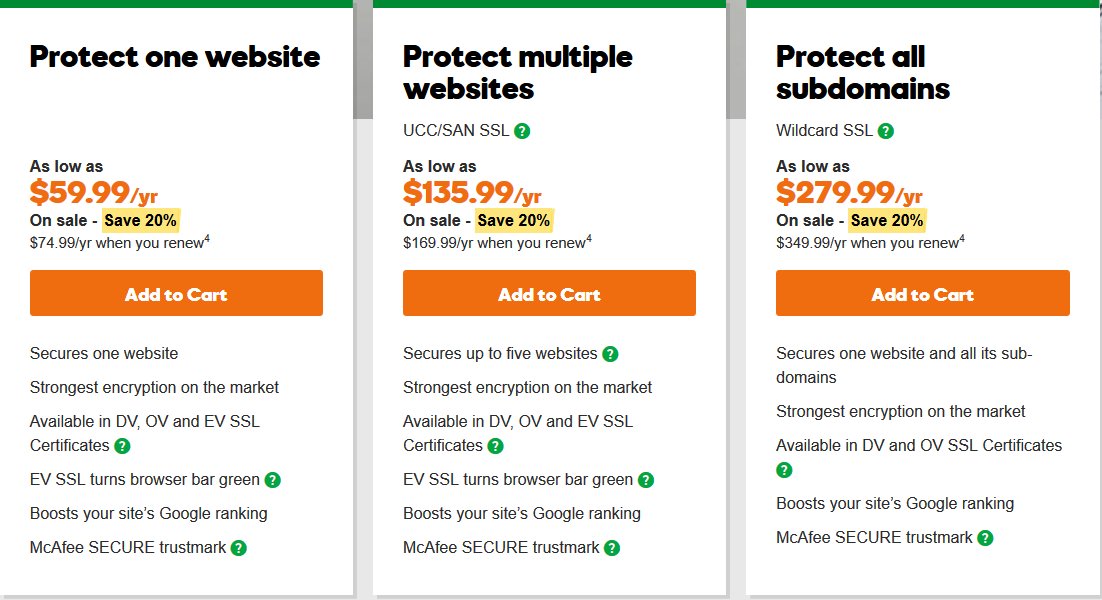
    Not what I recommend, but you can buy the SSL certificate your hosting company sells. GoDaddy and most hosting companies will install an SSL certificate for you. GoDaddy’s currently sale price is $59.99 for first year, renew at 74.99/yr.

    This is the simplest solution for you, if you are hosting on a site that doesn’t offer free SSL certificates, but it is not the best overall. GoDaddy technical support and user interface and pricing are not the best. One simple thing to check for how good a hosting company is: do they offer the latest software, frequently updated. LetsEncrypt is one software the hosting company should have installed.

    However, this probably costs more money than other options.

    Don’t let GoDaddy or other hosting company talk you into buying their more expensive certificate unless you know you need it. The encryption on all their certificates is the same (SHA-2 2048-bit encryption). All SSL certificates verify the domain name matches the site (so if a hacker intercepted your traffic, pretending to be your site, the “SSL padlock” would not show, and visitor’s web browsers would warn them). Very few companies would benefit from the extra validation that you are the company you claim to be (in addition to validating the domain name is correct), which is what is provided by the more expensive SSL certificates GoDaddy offers.

    2) Stay with GoDaddy until your current hosting expires, without SSL

    This is less expensive than discarding your current hosting subscription. But know that form information sent by your site, from your login form or any other form, is sent un-encrypted across the Internet.

    That makes this option only worthwhile if you are truly unable to afford the purchase of either the SSL certificate or new hosting that includes a free SSL certiifcate.

    You would take credit cards not on your site but through a payment processing company (e.g. PayPal or Stripe).

    You would protect your WordPress login with a “two-factor authentication” plugin so you have to log in both with a password and by typing in a code that is sent to an app on your cell phone. If someone steals your WordPress password, they still won’t be able to log in. (Don’t use the email option of your two-factor plugin, use the cell phone app; it is more secure, since most email is not transmitted encrypted unless you specifically configure using SSL/TLS for your email accounts.)

    3) Move to hosting that comes with free SSL certificates

    You can get free SSL certifcates by LetsEncrypt or other providers, on many hosting companies. LetsEncrypt has the same encryption as other SSL providers. Hosting companies can install LetsEncrypt on their servers and then you create and install your SSL certificates yourself. If LetsEncrypt is installed (most likely you’ll see it in your cPanel), simply specify which domain you want to make a certificate for, and LetsEncrypt installs the SSL certificate for you. You can make an SSL certificate for each domain name you’re hosting, one domain (or sub-domain) per certificate.

    My Hosting Recommendation

    I recommend hosting with SiteGround. Their StartUp plan would be adequate for most personal or small business sites. Currently their StartUp hosting is on sale for $3.95/month ($47.40/yr or lock in the sale price buying 2 or 3 years). Normal price (and price for additional years) is currently $9.95/month. Their hosting includes free LetsEncrypt SSL certificates, for every site you host.

    SiteGround’s technical support is much better than GoDaddy’s; their security is better than GoDaddy’s; their speed is better too. SiteGround technical support knows WordPress enough to troubleshoot plugin problems, so you can contact the plugin author to fix the specific bug; SiteGround can remove the bad plugin so your site is up again, quickly. This level of knowledge is very rare among hosting companies, but SiteGround trains all their technical support people to become this good.

    The Arizona WordPress Meetup only recommends SiteGround or WPEngine, based on the experience of several people who host sites for clients, and have learned the good and the bad of many hosting companies. They have also cleaned sites that got hacked on other hosts; moving to SiteGround or WPEngine, and installing Sucuri and WordFence (and/or iThemes Security) makes you much less likely to ever get hacked again.

    If the company can spend the money to get an SSL certificate from GoDaddy, it will spend less to simply switch Now to SiteGround.

    Get SiteGround Hosting through my link, they’ll give me a little money for referring you. Plus, you can have me start taking care of your site.

  • WordPress Ongoing Maintenance and Security

    WordPress Ongoing Maintenance and Security

    Having web sites run smoothly and safe from hackers, is important to me. It probably is important to you too, if you think about it a little. If you heard of any web site getting hacked, you know that could ruin your business day quickly.

    When you find out your site has been hacked, or your site stopped working so you can’t generate sales, you know you’re not going to be having a good day.

    After all, it’s easier to prevent problems like these, than to fix them…

    You have been told, already, you need to keep your software updated… You need to do regular backups… You know you should be blocking hackers, even if you don’t know how… Are you hoping you can last a little longer, letting maintenance slide?

    Preventing hackers from abusing your site is one very important part of running your web site, yet so many people and businesses just don’t have the time to do all the steps it takes. Even if you know how, or learn how, it’s not a good use of your time. You have better things to do!

    We all know your web site working, the way it should, helps to keep your reputation good. It also increases sales, right?

    Maintenance, done frequently, is important for your site.

    Latest updates to your WordPress software (and all other software) does several things, including fixing bugs that keep your site operating well, adding new features, and also fixing any security problems that have been discovered.

    Hackers know all those security problems. They study every security problem found world-wide, for how to take advantage of them.

    Updates Without Problems

    If an update does make a problem on your site, I know how to identify the problem very quickly, and get your site working again.

    However, I also prevent problems by testing plugin updates on a testing site, before doing the update on your site.

    I can replicate your site setup, plugins, theme, and content, on a testing site that is not accessible from the Internet. I will check the updates don’t introduce errors, whether with PHP or the WordPress database or other plugins.

    How Do You Get Your Site Secure From Hackers?

    Whether hackers want to post ads for their junk, or add links to steal traffic from you, or install malware to get your private information, or use your website hosting account to hack other sites, I hate hackers!

    Most businesses don’t have anyone who knows how to do maintenance and security checks properly. It’s complex. It takes time to learn, time to check everything each month. Most people could learn to do it themselves, if they were interested and had the time; but it’s just not your most fun and exciting thing to do. It’s not what you would best be spending your time on.

    (If that does sound good to you, contact me, I need more people helping have web sites run smoothly and be safe from hackers…)

    There are WordPress plugins that take care of many security steps. These have to be configured, and tested (some website hosting companies have non-standard server configurations, so not all security options will work on all hosting). [Note: If you’re on a Microsoft IIS server, which can’t use the most common WordPress security plugins, I feel for you, and I can help some…]

    You have to host your WordPress site on a company that has very strong security. Most of the best-known hosting companies are negligent about security; they don’t even keep the server software current; they don’t know WordPress security and troubleshooting; and they are not actively looking for ways to improve security. The best hosting companies have staff researching global security discussion boards for the latest hacker vulnerabilities, and put specific security rules in dedicated hardware installed between the Internet and the servers they host your site on.

    Another important security step is using passwords for every login that are difficult for hackers to guess. And the way we’ve been taught to make “secure” passwords, for example substituting punctuation for vowels or adding a digit and punctuation mark at the end, are known by hackers too — and now those passwords are easily and quickly guessed. Long computer-generated passwords are highly secure, but impossible for people to remember and difficult to type. I can teach you how to make secure passwords both easy to remember and easy to type.

    What I Provide

    Whether you want to learn to do it yourself, or you want me to take care of your maintenance and site security, here is what I provide:

    • Set up your WordPress site so it runs well. This includes removing plugins you don’t use, or that are security risks, or haven’t been updated in ages; adding plugins that are essential to the your site running properly; setting up site security so the most common attacks are blocked
    • Keep your site security updated so it is much harder to hack (so you keep out most hackers, but I can’t stop government-level hacking groups).
    • Keep current and past backups so your site can be recovered if something goes wrong. You always need a good backup!
    • If you have more than one site, or know you want more sites, I can set up WordPress Multi-Site for you, easier for most companies than working with many single-site installations of WordPress.
    • Select good plugins and themes. I find well written plugins and themes, that work well, don’t slow your site down, and are unlikely to have security vulnerabilities that hackers could exploit. Tip: with the WordPress block editor, you most likely can use the default TwentyTwenty theme, or a child theme that simply specifies your colors.
    • Migrate your site to an excellent hosting company, if you think you might already be hacked, or if you don’t know your host has excellent security and technical support. A few hosting companies charge comparable amounts per year of hosting, but provide much better quality service and much better protection against hackers, than the normal hosting company. You almost certainly can’t find better hosting on your own, than the Arizona WordPress Meetup has found.
    • Work with your hosting company technical support, to resolve any issues, so you won’t have to. (You’ll be able to use them or me for technical support.)
    • Improve your marketing, including install and configure software for telling Facebook, Twitter, LinkedIn, Pinterest and other social media sites what you want them to display (text and image) when someone references a page on your site.
    • Find what would speed up your site, which your visitors will love and so will search engines.

    Contact me about your site maintenance and security and what you want, and we’ll know if we’re a good match.

    Improve Your WordPress Site

    Consistent monthly amount, low $20 setup charge.

    Most basic sites, the kinds most small businesses need, I charge only $80/month, whether everything is working (that’s my job) or I have to put in many hours fixing something. This includes the first month, when I have to setup or reconfigure and check everything.

    For enhancing your website, we’ll talk about what you need and I’ll let you know if I can include it in your monthly maintenance, or if it will cost extra; we’ll agree before I make the enhancements.

    No contract, and I ask you set up minimum 6 months auto-pay so you don’t have to remember. Cancel any time, simply don’t pay for the next month and please let me know; but I don’t give refunds, since each month I will keep your site working.