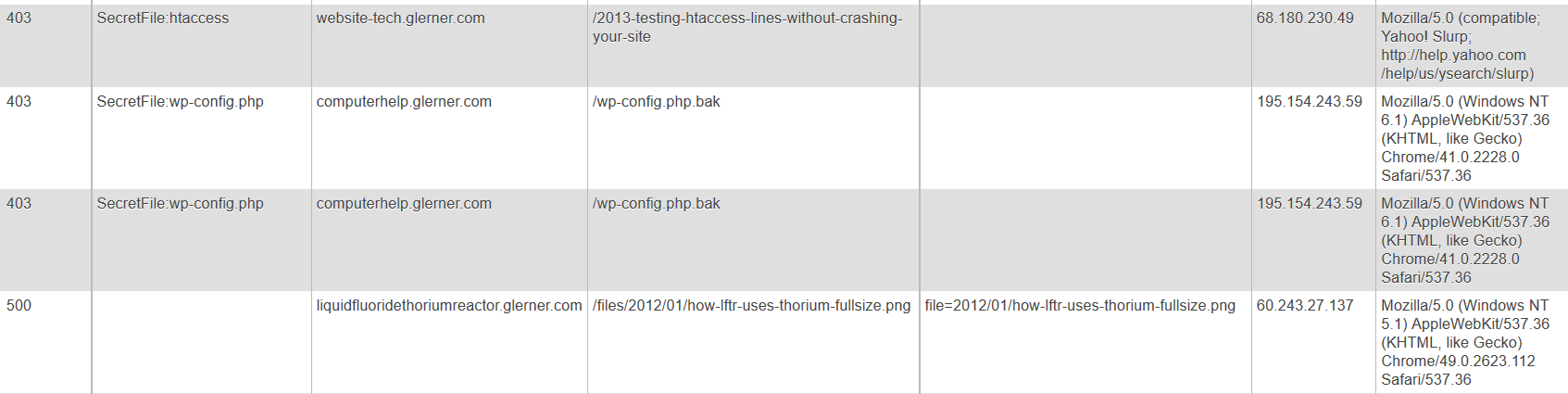
I want to know when there are errors on my site.
“404: File Not Found” errors can be from forgetting to upload an image, or from typing a URL wrong for a link to another page on my site. They can also be from people typing a file name wrong (some words are commonly mis-spelled). I can correct all of these, if I know about them.
Most people have to remember to check their site logs. (But they don’t.) I want the option of having the server send me an email.
Yes, I get emails about made-up names search engines look for, and made-up names spammers search for. I just delete these emails, part of web site maintenance (or I turn off emails about errors that didn’t start from my site, e.g. hackers searching). A few search bots are so bad, I have my site not send me emails about their “missing files”; the Bing-bot is drunk.
I also want to know about some categories of 403: Access Denied requests, to make sure that none are for files that should be permitted. I’ve had some WordPress plugins, for example, that produced file names with double slashes in them, which my security system was blocking; I needed to know that was going on, and what exactly was making those legitimate file requests get blocked. I needed full disclosure from my server.
Here is how I have the server give me the reports I need. (Another post will cover the security system I use, and the modifications to get the full disclosure from it.)
What you Need to Use This
I’m writing to experienced PHP programmers. You have to be able to understand, install, test PHP programs. This works on my server, LunarPages hosting and an IIS server, but accesses server variables that might be different on your server; there is no way I can know the details of your server (unless you hire me to install this for you). This might not fully work on your server, or might need modification! If you can’t debug PHP, for server-level functions, don’t try this; have me or another programmer do this for you.
This works best on Apache web servers. This also works on IIS servers, though they will probably give less detailed reporting, and may block writing the error log entries. (I’m not going to give IIS instructions here, if you have an IIS server you probably already know how to adapt these instructions. In another post I’ll show my web.config file changes for IIS.)
How to Call This
I have my server error pages, 403.php 404.php 500.php (specified in .htaccess) include errortowebmaster.php. I have all these files in /public_html/shared (and have symbolic links defined so the shared folder literally does get shared by all my web sites).
Initializing errortowebmaster.php
So far, I am doing some standard initializing variables.
LinkChecker is a good free program to check for broken links on your site; I want to not get an email for each link it finds, since it produces good reports itself. I simplify the http agent field (and have these defined in one place should the agent ever change).
What Caused 403:Access Denied Errors?
I am using the 5G Blacklist/Firewall from http://perishablepress.com/5g-blacklist-2013/ to block access by hackers and spammers. It works on commonly used patterns in several server fields, not on constantly-updated IP addresses or constantly-spoofed User Agent fields. I highly recommend reading their pages, so you understand how it works.
However, the 5G Blacklist needs testing, to make sure nothing on your server gets blocked inadvertently. Another post will show how I customized the 5G Blacklist script; this post shows how I use server variables I set, to give me reports — what phrase triggered what section of the Blacklist.
if ( (getenv("REDIRECT_noRewrite") !== FALSE) || (getenv("noRewrite") !== FALSE) ){
$htaccessErrors[] = 'Module mod_rewrite.c not installed or not enabled';
}
if (getenv("REDIRECT_dotHTLocation") !== FALSE) {
/* for testing only, which .htaccess file is being triggered? The root or a subdomain? Testing showed that on LunarPages hosting, only the QueryString section of 5G Blacklist needs to be in a subdomain's .htaccess file -- easier to maintain updates with most of the 5G Blacklist in only one place */
$htaccessErrors[] = '.htaccess location:' . getenv("REDIRECT_dotHTLocation");
} elseif (getenv("dotHTLocation") !== FALSE) {
$htaccessErrors[] = '.htaccess location:' . getenv("dotHTLocation");
}
if (isset($_SERVER['REDIRECT_noUserAgent']) || isset($_SERVER['noUserAgent']) ) {
$htaccessErrors[] = 'NoUserAgent';
}
/* root .htacess sets variable, subdomain .htaccess sets REDIRECT_variable, since the root checks first then redirects to the subdomain */
/* variable names must exactly match what shows up in $_SERVER, is case sensitive (e.g. badQueryString not BadQueryString) */
if (getenv("REDIRECT_badQueryString") !== FALSE) {
$htaccessErrors[] = 'badQueryString:'.getenv("REDIRECT_badQueryString");
$sendMail = $sendMail ? $emailQueryString : false;
} elseif (getenv("REDIRECT_REDIRECT_badQueryString") !== FALSE) {
$htaccessErrors[] = 'badQueryString:'.getenv("REDIRECT_REDIRECT_badQueryString");
$sendMail = $sendMail ? $emailQueryString : false;
} elseif ($querystring=='QUERY_STRING') { /* from IIS web.config */
$htaccessErrors[] = 'badQueryString';
$sendMail = $sendMail ? $emailQueryString : false;
}
if (getenv("REDIRECT_badRequestString") !== FALSE) {
$htaccessErrors[] = 'badRequestString:' . getenv("REDIRECT_badRequestString");
$sendMail = $sendMail ? $emailRequestString : false;
} elseif (getenv("REDIRECT_REDIRECT_badRequestString") !== FALSE) {
$htaccessErrors[] = 'badRequestString:' . getenv("REDIRECT_REDIRECT_badRequestString");
$sendMail = $sendMail ? $emailRequestString : false;
} elseif ($querystring=='URL_REQUEST_STRING') { /* from IIS web.config */
$htaccessErrors[] = 'badRequestString';
$sendMail = $sendMail ? $emailRequestString : false;
}
if (getenv("REDIRECT_badUserAgent") !== FALSE) {
$htaccessErrors[] = 'badUserAgent:' . getenv("REDIRECT_badUserAgent");
$sendMail = $sendMail ? $emailUserAgent : false;
} elseif (getenv("REDIRECT_REDIRECT_badUserAgent") !== FALSE) {
$htaccessErrors[] = 'badUserAgent:' . getenv("REDIRECT_REDIRECT_badUserAgent");
$sendMail = $sendMail ? $emailUserAgent : false;
} elseif ($querystring=='USER_AGENT') { /* from IIS web.config */
$htaccessErrors[] = 'badUserAgent';
$sendMail = $sendMail ? $emailUserAgent : false;
}
if ( getenv("REDIRECT_badRequestMethod") !== FALSE ) {
$htaccessErrors[] = 'badRequestMethod:' . getenv("REDIRECT_badRequestMethod");
$sendMail = $sendMail ? $emailRequestMethod : false;
} elseif ( getenv("REDIRECT_REDIRECT_badRequestMethod") !== FALSE ) {
$htaccessErrors[] = 'badRequestMethod:' . getenv("REDIRECT_REDIRECT_badRequestMethod");
$sendMail = $sendMail ? $emailRequestMethod : false;
}
if ( (getenv("REDIRECT_badCharsInRequest") !== FALSE) || (getenv("REDIRECT_REDIRECT_badCharsInRequest") !== FALSE) ) {
$htaccessErrors[] = 'badCharsInRequest (e.g. CRLF)';
$sendMail = $sendMail ? $emailBadChars : false;
}
/* testing, don't know yet which .htaccess catches badCharsInRequest problems */
if ( (getenv("REDIRECT_badCharsInRequestLC") !== FALSE) || (getenv("REDIRECT_REDIRECT_badCharsInRequestLC") !== FALSE) ) {
$htaccessErrors[] = 'badCharsInRequestLC (e.g. CRLF)';
$sendMail = $sendMail ? $emailBadChars : false;
}
if ( (getenv("REDIRECT_badCookie") !== FALSE) || (getenv("REDIRECT_REDIRECT_badCookie") !== FALSE) ) {
$htaccessErrors[] = 'badCookie';
$sendMail = $sendMail ? $emailCookie : false;
}
/* testing, don't know yet which .htaccess catches cookie problems */
if ( (getenv("REDIRECT_badCookieLC") !== FALSE) || (getenv("REDIRECT_REDIRECT_badCookieLC") !== FALSE) ) {
$htaccessErrors[] = 'badCookieLC';
$sendMail = $sendMail ? $emailCookie : false;
}
if (isset($_SERVER['REDIRECT_ERROR_NOTES'])) {
$htaccessErrors[] = 'Error Notes:'.$_SERVER['REDIRECT_ERROR_NOTES'];
} elseif (isset($_SERVER['REDIRECT_REDIRECT_ERROR_NOTES'])) {
$htaccessErrors[] = 'Error Notes:'.$_SERVER['REDIRECT_REDIRECT_ERROR_NOTES'];
}
/* badNuisance should be sent directly to bad-webbot.php, display minimal page. Nuisance in QUERY_STRING would arrive here */
if (isset($_SERVER['REDIRECT_badNuisance'])) {
$htaccessErrors[] = 'Nuisance:'.$_SERVER['REDIRECT_badNuisance'];
$sendMail = false;
} elseif ($querystring=='NUISANCE') {
/* from IIS web.config */
$htaccessErrors[] = 'Nuisance';
$sendMail = false;
}
if (isset($_SERVER['REDIRECT_badBot']) || isset($_SERVER['REDIRECT_badBadHacker']) ) {
/* badBot set in /shared/blackhole/.htaccess, for the George Lerner modified version of http://perishablepress.com/blackhole-bad-bots/ which makes lines to cut/paste into .htaccess */
if (isset($_SERVER['REDIRECT_badBot']) ) {
$htaccessErrors[] = 'badBot '. $_SERVER['REDIRECT_badBot'];
$sendMail = $sendMail ? $emailBot : false;
}
/* If an IP address gives too many 403 errors, add them to the badBadHacker list in .htaccess. Future enhancement, have this file keep count, make a log file with lines to cut/paste into .htaccess */
if (isset($_SERVER['REDIRECT_badBadHacker']) ) {
$htaccessErrors[] = 'blacklisted by IP';
$sendMail = $sendMail ? $emailHacker : false;
}
} elseif ($querystring=='IP_ADDRESS') {
/* from IIS web.config */
$htaccessErrors[] = 'blacklisted by IP';
$sendMail = $sendMail ? $emailHacker : false;
}
On my server, custom server variables get prefixed with 'REDIRECT_' and I tested both with and without the prefix; this is definitely something that your server could do differently. Check the $_SERVER and $_ENV variables for the actual variable names on your server.
Very Detailed Error Display for My Computer
Put your IP addresses (e.g. home computer, work computer, and smart phone) in $myipaddress, set in your secret configuration file (secret because it contains your IP address, which will let baddies see your server configuration). Not "secure" but probably "secure enough"; someone who sees your screen can get anything they want from you; someone who has access to your configuration file has full access to your site. Sometimes is Very useful for debugging to see the server variables, especially when I am configuring a new client's account. Just browse to any non-existent file name on their web site from my computer, and my 404.php shows me (and only me) $_SERVER and $_ENV.
For any IP address I know, I also display my name for it. For example, don't put the local coffee shop in the "My IP" list, but it makes sense to identify the coffee shop so you know "that was me testing things" or "hmm, I was at the coffee shop, but didn't access That file..." (Pay attention to who can see your screen, even from a distance!) I also put names to the IP address of web site clients, since they will have a lot more errors as they develop new pages on their site, (those few times I notice an ongoing problem and give them the solution, they love it).
Displaying the Detailed Troubleshooting & Error Information
Note: For getting this to display well in WordPress, I changed <pre> to <code> (open and close tags) in the next section. You'll probably like the display better if you use pre in your code.
if (in_array($ip, $myipaddress)) {
echo "
.htaccess Errors:
";
print_r($htaccessErrors);
echo "
";
echo "
_SERVER:
";
print_r($_SERVER);
echo "
_ENV:
";
print_r($_ENV);
echo "
";
if (isset($_GET)) {
foreach ($_GET as $arg) {
$clean = filter_input(INPUT_GET, $arg, FILTER_SANITIZE_STRING); // new PHP function
print "Get Parameter: $clean
";
}
}
if (isset($argv)) {
// IIS (Cart32) leaves in $_SERVER['QUERY_STRING'], or $_SERVER['argv'], both unparsed, on error pages.
foreach ($argv as $arg) {
$clean = filter_input(INPUT_GET, $arg, FILTER_SANITIZE_STRING);
print "Argv Parameter: $clean
";
}
} else if (isset($_SERVER['argv'])) {
foreach ($_SERVER['argv'] as $arg) {
$clean = filter_input(INPUT_GET, $arg, FILTER_SANITIZE_STRING);
print "_SERVER argv Parameter: $clean
";
}
}
}
$ipText = $ip;
switch ($ip) {
case "12.345.67.89" :
case "123.45.678.90" :
$ipText .= " (My Home)";
break;
case "98.76.54.32" :
$ipText .= " (My Work)";
break;
default:
// $ipText .= " (unknown)";
}
$combine = $ipText . " tried to load \n";
Writing an Error Log
After some checking for uninitialized variables, write a brief error result to log files. I deliberately keep 403 errors out of the system PHP error log, as they require different attention. (Tempting to move 404 errors to their own file, so many idiot search engines/bots, but then I wouldn't see when I forgot to upload an image... I do, however, note when a request originated from a file on my server, since this is much more likely something I need to fix.)
if (strpos($requri, $servname) !== false) {
/* MVC's IIS server gives full URL and status in requri */
if ($status !== '') {
$subject = $status.' '.$requri;
} else {
$subject = $requri;
}
$combine .= " $requri";
} else {
$subject = "$status $servname $requri";
$combine .= " $servname$requri";
}
$mycookie = "";
foreach ($_COOKIE as $cookie_name => $cookie_text)
{
$mycookie .= "\t" . $cookie_name . ": " . $cookie_text . " \n";
}
if (!isset($browser_name)) { $browser_name = "(unknown) "; }
// set by script from http://techpatterns.com/downloads/php_browser_detection.php
if (!isset($browser_ver)) { $browser_ver = "(unknown) "; }
Display Info On Web Browser
$message = " $note
\n
$combine
\n
Remote Host = $remoteHost
\n
Query string = $querystring
\n
HTTP Referer = $httpref
User Agent = $httpagent
\n
$today
\n
Cookies =
$mycookie\n
Sending an Email to Site Administrator
The email will be sent to the address in $adminemail, defined in your secret configuration file.
function implode_r($glue,$arr){
$ret_str = "";
foreach($arr as $a){
if ($ret_str === "") {
$ret_str .= (is_array($a)) ? implode_r($glue,$a) : $a;
} else {
$ret_str .= (is_array($a)) ? implode_r($glue,$a) : $glue . $a;
}
}
return $ret_str;
}
if (!isset($logfile)) {
$logfile = getenv("DOCUMENT_ROOT") . "/error_log";
}
if (!isset($deniedLogfile)) {
$deniedLogfile = $logfile.'403';
}
if (!file_exists($logfile)) {
$fh = @fopen($logfile, 'w');
if ($fh !== FALSE) { fwrite($fh, "ErrorToWebMaster New Error File\n"); fclose($fh); }
}
if (!file_exists($deniedLogfile)) {
/* some servers prohibit fopen, so @ before it to prevent error messages */
$fh = @fopen($deniedLogfile, 'w');
if ($fh !== FALSE) { fwrite($fh, "ErrorToWebMaster New 403 Error File\n"); fclose($fh); }
}
if (isset($htaccessErrors)) {
$htaccessErrorsStr = implode_r(" | ",$htaccessErrors);
/* Cart32 wimpy IIS hosting doesn't allow error_log ("permission denied") so @ before it */
@error_log("htaccess Errors = $htaccessErrorsStr | $ipText Accessing: $servname, $requri $now \n",3,$deniedLogfile);
} else {
@error_log("$ipText Accessing: $servname, $requri $now \n",3,$logfile);
$htaccessErrorsStr = '';
}
/* $message was for on screen, $message2 is for emailing */
$message2 = "htaccess Errors = $htaccessErrorsStr\n
$combine \n
Remote Host = $remoteHost\n
Query string = $querystring \n
HTTP Referer = $httpref\n
User Agent = $httpagent \n
$today \n
Cookies = \n$mycookie \n";
$message2 .= "\nBrowser detected as: " . $browser_name . "version " . $browser_ver;
$fh = @fopen($logfile, 'r');
if (filesize($logfile) == 0) {
$theData = "";
} else {
$theData = fread($fh, filesize($logfile));
}
fclose($fh);
$message2 .= "\n\n[Error Log]: $logfile\n" . $theData;
$message2 .= "\n[End of Error Log]\n";
$message2 .= print_r($_SERVER,true);
$message2 .= print_r($_ENV,true);
$to = $adminemail;
$from = "From: " . $adminemail . "\r\n";
if (isset($_SERVER['REDIRECT_ERROR_NOTES']) ) {
$sendMail = false;
} else $sendMail = true;
if ( (stristr($docroot,"xampp") == FALSE) && ($requri != "/wp-login.php") && ($httpagent != 'LinkChecker/') && ($httpagent != 'LinksManager.com_bot') ) {
if ($sendMail !== false) {
mail($to, $subject, $message2, $from);
}
}
?>
Questions?
Post your comments or questions here, and of course if you would rather I set this up for you and get it working on your web site, let me know. Contact Me.