The point of this post is simple: Don’t believe anything based on an email’s “From” or “Reply To” fields.
Don’t get indignant or even mildly annoyed. Don’t make any decision, based on “fakers!”, or based on getting suckered. Just press or click “Delete”.
One of the decisions to avoid is “another spam from ___ sender, can’t trust them at all” (GMail, Apple Mail, any trusted source will be “fake used” by spammers, because they are a trusted source).
Should you trace where your emails actually come from, like I show here? Nope! Waste of your time. Just get this fakery exists. (Do this for 1 or 2 emails, you’ll know you don’t have time for this…)
How kind of “them”, they gave me an actual example to show.
The “From:” field of an email is easily faked. Just like you can write anything on the outside of an envelope, the From field is an easy place for an email spammer to lie. The “Reply To:” field is easily faked too.
This was delivered to my Spam folder:

Oh look, it is even “from a GMail account”, so we’re supposed to believe it is real.
Is this email actually from a GMail account? No!
Notice these things from the summary below:
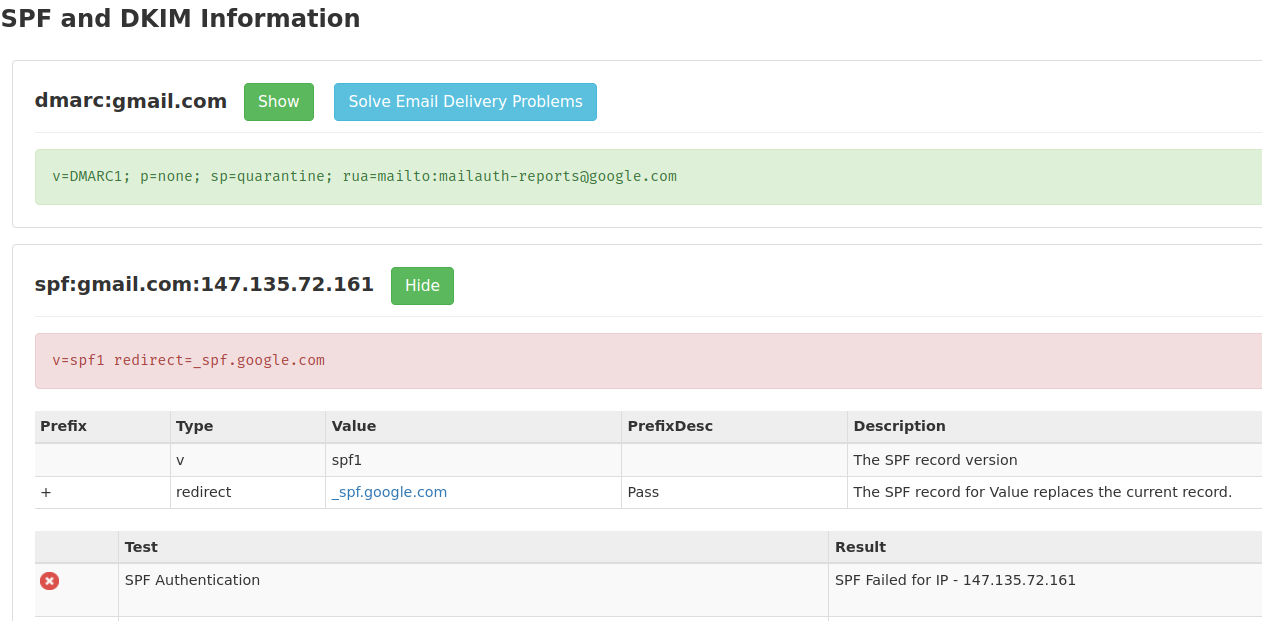
transitioning domain of _spf.google.com does not designate 147.135.72.161 as permitted sendernope, phony sender
smtp.mailfrom=george@gmail.com; dmarc=failnope, phony sender
from mtx1.gskrmail.com (mtx1.gskrmail.com [147.135.72.161])actual sender
That equals “It was sent from gskrmail.com, not from GMail”.
They “lied on the outside of the envelope”, putting a wrong “From” email address.
This is from my email program’s summary of the email headers:
Authentication-Results
mx.zohomail.com; spf=softfail (zohomail.com: transitioning domain of _spf.google.com does not designate 147.135.72.161 as permitted sender) smtp.mailfrom=george@gmail.com; dmarc=fail(p=none dis=none) header.from=gmail.com

Received
from mtx1.gskrmail.com (mtx1.gskrmail.com [147.135.72.161]) by mx.zohomail.com with SMTPS id 17050598302871018.8032972489663; Fri, 12 Jan 2024 03:43:50 -0800 (PST)
In the “full headers” I can see these:
Received-SPF: softfail (zohomail.com: transitioning domain of _spf.google.com does not designate 147.135.72.161 as permitted sender) client-ip=147.135.72.161;phony
envelope-from=george@gmail.com; helo=mtx1.gskrmail.com;dmarc=fail(p=none dis=none) phony, envelope lie, actual “Hello” is gskrmail and no, that is not my GMail address.
Easy Analysis of Email Headers
https://mxtoolbox.com/EmailHeaders.aspx
Paste the “full headers” of your email. Your email software has a way to “Show Source” or “View Original Headers”, or something like that.

Nope, not from GMail, but from gskrmail
and it shows the sender is “On a Blacklist”, a known spammer.

Nope, not from GMail, the email failed the SPF Authentication.
What To Do About Phony Senders?
Hopefully, your email program now alerts you when an email sender is unverified.
Don’t waste your time following up on these suspicious emails.
Just click “Delete” or “Spam” or “Phishing” (whichever you think is best) in your email program.
What Should You Pay Attention To?
Pay attention to what you want for your family.
Pay attention to what you want for your neighborhood, for your groups, for your closest friends.
You are more likely to get what you pay attention to.
Don’t pay attention to what gets you irate, indignant. Those emotions are addictive. “They” want you addicted, because every addict believes anything their drug dealer says.
When you are addicted, you can not pay attention to anything else.
Corporations want you to “buy more”, whether it is good for your family or not.
Too many politicians want you to “vote me into power”, not caring about your family at all.
Email spammers either want you to buy from a corporation, or vote for a power-greedy politician, or help them (the spammers & hackers) commit a crime.
Pay attention, instead, to what you want for your family and who will help you have what you want for your family.